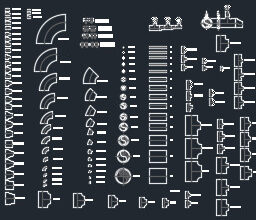
PVC Pipe & Fitting Dynamic Blocks DWG – Free Download
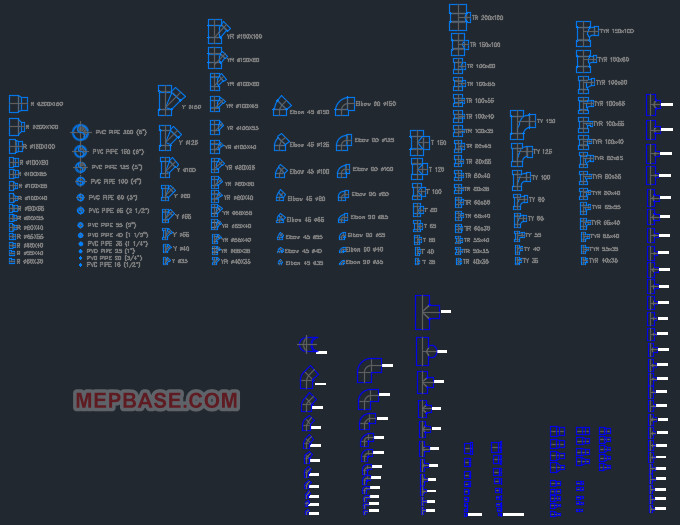
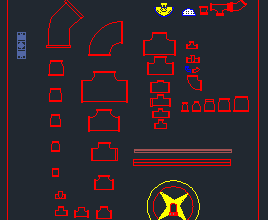
Looking for ready-made PVC pipe and fitting dynamic blocks for AutoCAD? This free DWG gives you a complete set of fully dynamic 2D blocks, including elbows, tees, couplings, reducers and end caps, where a single block adjusts to multiple sizes using grips and the Properties palette. There’s no need to keep dozens of separate blocks for every diameter: insert one fitting, pick the size, flip or stretch it, and it’s ready.
What Is This DWG File?
This is a ready-to-use AutoCAD drawing containing a library of PVC pipe and fitting dynamic blocks for plumbing, drainage and water supply design. Unlike ordinary static blocks, these are parametric dynamic blocks: each fitting carries built-in parameters and actions, so you can change its size, flip it or stretch it directly with grips, without exploding or redrawing anything.
One block covers a whole range of sizes, which keeps your drawing light and your block library clean. Because it is a standard DWG, it opens in AutoCAD and most DWG-compatible CAD programs.
Why Use Dynamic Blocks?
- Resize: pick the diameter from a dropdown in the Properties palette instead of inserting a different block each time.
- Flip: use the flip grip to reverse the fitting’s orientation without redrawing.
- Stretch: stretch grips let you extend pipe runs or adjust the fitting to suit your layout.
- Lighter files: fewer blocks to manage means smaller files and faster drawings.
File Details
| File Name | PVC-Pipe-And-Fitting.dwg |
| File Type | AutoCAD DWG, dynamic 2D blocks |
| Block Type | Dynamic (parametric, grip-editable) |
| Compatibility | AutoCAD 2007 and all newer versions |
| Units | Millimetres (mm) |
| File Size | ~7.5 MB |
Dynamic Fittings Included in This DWG
The library includes the following dynamic 2D blocks, each adjustable to a range of sizes:
| Fitting | Common Use |
|---|---|
| 90° elbow | Right-angle change in pipe direction |
| 45° elbow | Gentle change in direction with lower friction |
| Equal tee | Branch connection at 90° |
| Reducing tee | Branch with a smaller outlet |
| Coupling / socket | Joining two pipes of the same size |
| Reducer / reducing bush | Connecting two different pipe sizes |
| End cap / plug | Closing the end of a pipe |
| Union | Removable joint for maintenance |
| Cross | Four-way connection |
| Pipe runs (various sizes) | Straight pipe sections in standard diameters |
| P-trap / bend | Drainage and sanitary connections |
| Cleanout | Access point for maintenance |
uPVC Pipe Drafting Notes
- Sizes are outside diameters: metric uPVC pipes are named by their outside diameter, so a 110 mm pipe is roughly equal to DN100. Label pipes the same way the project specification does to avoid confusion on site.
- Allow for expansion: PVC expands far more with temperature than steel, so long horizontal runs and tall stacks need expansion joints or sockets at the intervals given by the manufacturer.
- Support spacing: PVC needs closer supports than metal pipe. Follow the manufacturer’s support spacing table for each size, and add supports at every change of direction.
How to Use the Dynamic Blocks
- Download the DWG file from the button below and save it to your computer.
- Open it in AutoCAD 2007 or newer, or any DWG-compatible CAD software.
- Copy the fitting you need into your drawing (Ctrl+C / Ctrl+V) or insert it as a block.
- Select the block to show its grips. Use the size dropdown in the Properties palette, or the lookup grip, to set the diameter.
- Use the flip grip to mirror it and the stretch grips to adjust length, then connect it to your pipe runs.
- Check that your drawing units are millimetres before inserting.
Who Is This Free Download For?
- MEP engineers and designers preparing plumbing, drainage and water supply layouts
- CAD draftsmen who want smart, resizable PVC fitting blocks to speed up detailing
- Site and QS teams referencing fitting types and sizes for take-offs and coordination
PVC Pipe and Fitting Dynamic Blocks Free Download
Click the button below to download the DWG file. No sign-up required.
Checking…
Frequently Asked Questions
Are these PVC fittings dynamic blocks?
Yes. Every fitting in this download is an AutoCAD dynamic block. You can change its size, flip it and stretch it using grips and the Properties palette, so a single block works for multiple diameters.
How do I change the size of a fitting?
Select the block and either pick the size from the dropdown in the Properties palette or drag the lookup grip. The block updates automatically, with no exploding or redrawing needed.
Which AutoCAD version do I need?
The file is saved in AutoCAD 2007 DWG format, so it opens in AutoCAD 2007 and every newer release. Dynamic blocks have been supported since AutoCAD 2006.
What units is the drawing in?
The blocks are drawn in millimetres (mm). Make sure your drawing uses the same units before inserting them.
Related Downloads
- AutoCAD Dynamic Plumbing Blocks DWG
- Multi-Floor Drainage and Storm Water Shop Drawing
- MEP Fittings and Valves Dynamic Blocks DWG
This DWG is shared for reference and educational use. Always verify sizes, materials and standards against your project specification and applicable plumbing codes before construction.