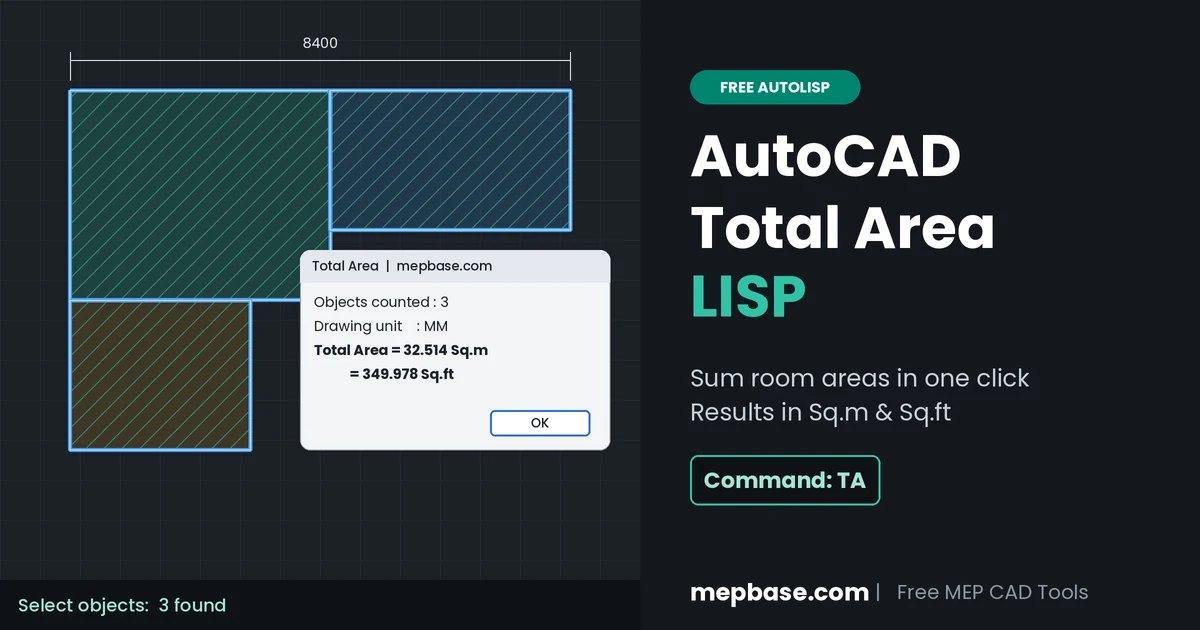
Adding up room areas one by one with the AREA command is slow, and one missed room breaks your whole calculation. This free AutoCAD total area LISP does it in one step. Type TA, select your rooms, and get the total area in Sq.m and Sq.ft at the same time.
It is built for MEP engineers and draftsmen who need floor areas for HVAC load checks, sprinkler counts and BOQ quantities. It reads polylines, hatches, circles and regions, and works in any drawing unit.
File Information
- File Name: TotalArea.lsp (inside TotalArea.zip)
- File Type: .lsp (AutoLISP)
- Command:
TA(full nameTOTALAREA) - File Size: about 7 KB
- Software: Full AutoCAD on Windows, including AutoCAD MEP
- Usage: Free
What the Total Area LISP Does
- Sums many objects at once: pick rooms one by one or use a window selection.
- Works in any drawing unit: choose MM, CM, Meter, Inch or Feet. The LISP remembers your last choice.
- Shows Sq.m and Sq.ft together: no manual conversion needed.
- Handles open polylines: it closes them from start to end point, like the AutoCAD AREA command, and tells you how many were open.
- Writes the result in the drawing: click a point to place TOTAL AREA = xx.xx Sq.m, centered on your click.
- Sizes the text for you: text height follows the size of your selection. You can also set your own height once.
Supported Objects
| Object | Area Counted | Note |
|---|---|---|
| Closed polyline | Yes | Best choice for room outlines |
| Open polyline | Yes | Closed from start to end point; shown as a note in the result |
| Hatch | Yes | Do not select a hatch and its boundary together |
| Circle, ellipse, closed spline | Yes | Useful for round tanks, shafts and equipment pads |
| Region | Yes | Good for areas with holes (region subtract) |
| Lines and arcs | No | Run BOUNDARY (BO) inside the room first to make a closed polyline |
If your rooms are already hatched, the LISP can read the hatch area directly. For cleaner area hatches, see our guide to creating a custom hatch pattern in AutoCAD.
How to Use the TA Command
- Type
APPLOAD, select TotalArea.lsp and click Load. To load it in every drawing, add it to the Startup Suite in the same window. - Type
TAand press Enter. - At
Drawing unit [MM/CM/Meter/Inch/Feet], pick the unit your drawing is drawn in, or press Enter to keep the last one. - Select your rooms and press Enter.
- A result window shows the object count, unit and total area in Sq.m and Sq.ft. Click OK.
- Click a point to place the area text, or press Enter to skip. To change the text size, type
Hand enter a height. Enter 0 to go back to auto size.
Example: a room drawn in mm, 3157 x 2456, gives 7.754 Sq.m (83.464 Sq.ft).
Where MEP Engineers Use Total Area
HVAC load check: floor area is the starting point for a quick cooling load estimate before the detailed calculation. Multiply the total area by your project’s W/m² or ft²/TR rule of thumb as a first check. Final equipment sizing still needs a proper heat load calculation.
Sprinkler count estimate: divide the protected area by the maximum coverage per sprinkler. As per NFPA 13 (2022 edition), standard spray sprinklers cover up to 20.9 m² (225 ft²) in light hazard (hydraulically calculated) and 12.1 m² (130 ft²) in ordinary hazard. This gives a minimum count only. Beams, walls and obstructions decide the final layout. To place the grid itself, use our Fire Sprinkler Layout LISP for AutoCAD.
BOQ quantities: false ceiling, duct insulation for plenums, floor drains per zone and other area-based items all start from a correct room area.
Need the area in another unit, like cm² or in²? Use the free MEP Unit Converter.
Practical Notes Before You Trust the Number
| Problem | Cause | Fix |
|---|---|---|
| Sq.m shows 0.000 | Wrong unit, e.g. MM chosen for a drawing made in meters | Run TA again and pick the correct unit |
| Area is too large | Dimension text does not match the geometry, or the outline is drawn to the wrong line | Check one room with the AREA command and compare |
| Area is double | Both the boundary and its hatch were selected | Select only one of them, or isolate the hatch layer |
| “Open polyline” note in result | Polyline was not closed with the Close option | Press Ctrl+1 and set Closed = Yes, or use PEDIT > Close |
| Area looks wrong | Polyline crosses over itself | Redraw it as a clean closed outline |
| Text too small or too big | Auto height does not suit the drawing | Type H at the text prompt and set your own height |
Tip: an .lsp file is plain text. You can open it in Notepad to review the code before loading it.
Download Total Area LISP
Click below to download TotalArea.zip. The link will appear after a short wait.
Checking…
Related Downloads
- Fire Sprinkler Layout LISP for AutoCAD
- AutoCAD Shortcut Keys and Commands List
- AutoCAD Blocks Library for MEP Systems
- MEPBase Tools: free MEP calculators
- All AutoLISP Tools
Frequently Asked Questions
Is the AutoCAD Total Area LISP free?
Yes. TotalArea.lsp is free to download and use in your projects.
Which AutoCAD versions does it work in?
It works in full AutoCAD on Windows, including AutoCAD MEP. It may not run in AutoCAD LT, because it uses Visual LISP (vla-) functions.
Can it calculate the area of hatches?
Yes. It reads the area of hatches, regions, circles, ellipses, splines and polylines. Do not select a hatch and its boundary together, or the area will be counted twice.
My rooms are drawn with lines. Will it work?
Lines have no area. Run the BOUNDARY command (BO), click inside each room to create a closed polyline, then run TA on those polylines.
How do I get the total area in square feet?
No conversion is needed. The result window shows the total in both Sq.m and Sq.ft at the same time.
Why does the result show 0.000 Sq.m?
The wrong drawing unit was selected. For example, a drawing made in meters but read as MM gives a tiny value. Run TA again and choose the unit your drawing was drawn in.
Found a bug or want a new feature, like per-room area labels or export to Excel? Leave a comment below. Stay connected with MEPBase.com for more AutoLISP tools, DWG files and AutoCAD add-ons.