Street Light Installation Detail DWG — Free Download
If you’re putting together an external lighting package, you already know how much time goes into drawing the same pole detail again and again. This one’s done for you. It’s a ready-to-use street light installation detail in DWG, free to download and free to edit, so you can drop it straight into your drawing set and adjust it to suit your project.
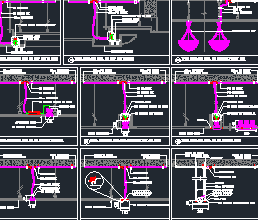
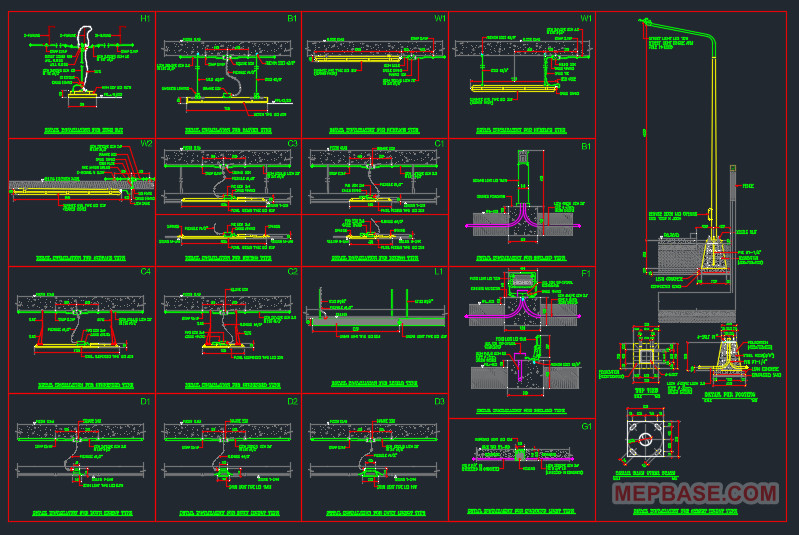
The file covers the full picture for a typical roadside, perimeter or compound light — foundation, anchor bolts, pole and arm, conduit routing and the cabling — all on one sheet and fully editable in AutoCAD. You can also download Complete Electrical Installation Details DWG For Free.
File details
| File type | DWG (AutoCAD drawing) |
| AutoCAD version | 2018 / 2019 / 2020 and later |
| Units | Metric |
| Content | Street light installation detail (single sheet) |
| Editable | Yes — fully editable, no password |
| Price | Free |
You’ll need AutoCAD or any DWG-compatible CAD viewer to open it. If you only want to look, a free DWG viewer will do; to edit, use AutoCAD or an equivalent.
What’s inside the drawing
The detail is built bottom to top, the same way you’d install it on site:
- Foundation — a cast concrete base with the anchor-bolt assembly set into it.
- Anchor bolts — J-bolts tied to L-rods (around Ø3/8″) with nuts to receive the base plate. The steel base plate is shown, with a stainless (SUS) plate option for corrosive or wet locations.
- Pole and arm — the pole with an outreach arm carrying the luminaire, plus the service door / hand-hole at the base for the cable entry and earth connection.
- Conduit routing — EMT (around Ø12) for exposed runs, PVC for buried sections, and a short flexible conduit at the connection points, held with strap clamps.
- Cabling — LSZH cable in two sizes: a heavier feeder (around 4 mm² + earth) running pole to pole, and a lighter drop (around 2.5 mm² + earth) up to the lamp.
- Weatherproof junction box — a sealed enclosure where the cables join, so water never reaches the connections.
Everything is drawn as proper CAD geometry on its own layers, so you can switch parts on and off, restyle dimensions, or trim it down to just the bits you need.
How to use it on your project
Don’t just paste it in and sign it off. A few quick checks first:
- Confirm the cable sizes. The detail shows typical sizes. Run your own volt-drop calc for the actual length of your circuit before you commit — long runs may push the feeder up a size.
- Match the foundation to your soil and pole. Base size and bolt layout depend on pole height, wind load and ground conditions. Treat the detail as a starting point, not a structural certificate.
- Set the bolt circle to your base plate. The anchor-bolt template has to match the pole you’re actually buying.
- Keep the LSZH spec if it’s required. For public, enclosed or occupied areas, Low Smoke Zero Halogen cable is usually a code requirement — don’t swap it for ordinary PVC to save a few units.
Used that way, the file saves you the drafting time without making the engineering decisions for you.
Quick component notes
A bit of background on the parts, in case you’re handing this to a junior or a site team:
Why a J-bolt?
The hook locks into the concrete and resists the pole being pulled out under wind load. A straight bolt relies only on bond and lifts out far more easily.
Why LSZH cable?
Low Smoke Zero Halogen gives off little smoke and no corrosive gas in a fire. For anywhere people walk or evacuate past, it’s the safe and usually mandatory choice.
Why two cable sizes?
The bigger one is the feeder carrying load between poles over distance; the smaller one is the short final drop to the single lamp. Sizing them both the same just wastes copper or risks volt-drop.
Why a weatherproof box?
Any cable joint outdoors has to sit in a sealed, IP-rated enclosure. An ordinary box lets water in and turns into a future fault.
Why the service door?
It’s the access point at the pole base for the cable connection, the fuse, and the earth bond. The cover has to seal properly or water and insects get in.
Frequently asked questions
Is this DWG really free to download?
Yes. It’s free to download and free to edit. Open it in AutoCAD and adjust it to suit your project.
Which AutoCAD version do I need?
It’s saved in the 2018 format, so AutoCAD 2018 or any later version opens it. Older versions may need a quick “save as” from a newer copy, or use a free DWG viewer just to look.
Can I edit the drawing?
Yes — it’s fully editable, on layers, with no password. Change dimensions, sizes, layers, anything.
Can I use it on a real project?
Use it as a base, but always confirm the cable sizing, foundation and pole details against your own design and local code. It’s a template, not a stamped design.
What’s LSZH cable and do I have to use it?
Low Smoke Zero Halogen — safer in a fire. For public or enclosed external areas it’s usually required by spec; check your project documents.
⬇ Download the Street Light Installation Detail DWG — Free