
AHU Plant Room Plan & Sections Shop Drawing Free Download
This free AHU plant room shop drawing shows a complete air handling unit plant room in plan and sections. An AHU plant room houses the air handling units along with their duct connections, chilled water piping, valves and controls that supply filtered, conditioned air to the building. A detailed shop drawing makes sure all of this is installed correctly, with proper access and without clashes on site.
The drawing is useful for MEP engineers, contractors and students for design, learning and execution.

What the Drawing Includes
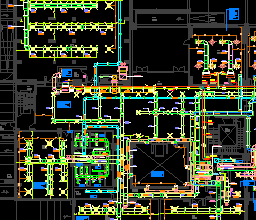
- Plan view of AHU units, ducts and chilled water pipes
- Sectional views showing equipment heights, duct levels and ceiling clearance
- Legends and notes for easy understanding of symbols
- MEP coordination details to avoid clashes with structural elements

Why an AHU Plant Room Shop Drawing Is Important
- Clear layout: shows the exact position of AHUs, ducts, piping, valves and accessories.
- Coordination: aligns HVAC with electrical, plumbing and structural elements.
- Efficient air distribution: helps plan duct routes with fewer bends and lower pressure loss.
- Good practice: follows common ASHRAE and SMACNA practice used on MEP projects.
- Easier installation: reduces site conflicts and rework during execution.
AHU Plant Room Design Notes
Keep these points in mind when you adapt the drawing to your own project:
- Service clearance: leave space on the access side for filter and fan maintenance, and a clear zone equal to the coil width for coil withdrawal. Always check the manufacturer’s submittal for exact figures.
- Condensate drain: draw-through AHUs run under negative pressure, so the drain trap must be deep enough for the unit’s static pressure, otherwise condensate will not drain and the drain pan will overflow.
- Chilled water valve set: show isolation valves, a strainer, control valve, balancing valve and pressure/temperature test points on each AHU coil connection.
- Vibration isolation: use flexible connectors on duct and pipe connections, and place the AHU on a housekeeping pad or vibration isolators.
- Fresh air intake: keep outdoor air intakes away from exhaust outlets, following the minimum separation distances in ASHRAE 62.1.
- Floor drain: provide a floor drain close to the AHU for condensate and maintenance water.
Applications of AHU Plant Room Drawings
- Used by HVAC contractors during installation
- Helpful for consultants and engineers during design review
- A learning tool for students and trainees in MEP drafting
- Reference material for facility management teams
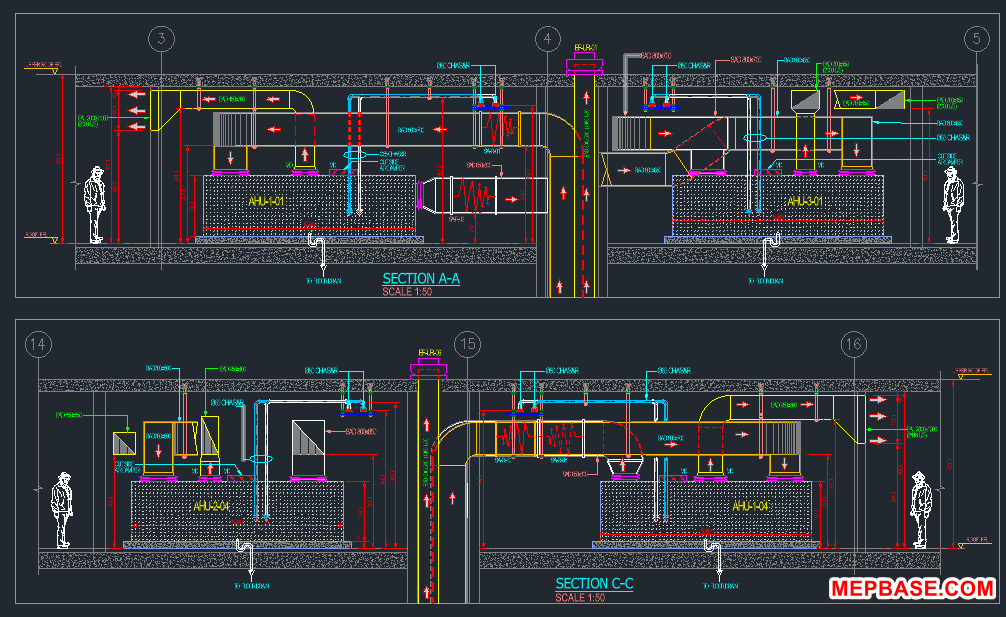
Free Download: AHU Plant Room Plan and Sections DWG
This shop drawing is prepared in AutoCAD format and can be easily edited to suit your project requirements.
Checking…
Related Downloads
- HVAC Ducting and Chilled Water System Shop Drawing DWG
- HVAC Typical Installation Details DWG
- HVAC Dynamic Blocks with Equipment Installation Details
Frequently Asked Questions
What is the minimum height for an AHU plant room?
It depends on the AHU size, but the room must fit the unit on its housekeeping pad plus the duct connections above it, with space to work. Check the AHU submittal height and the largest duct size before fixing the slab level.
Why does an AHU need a deep condensate trap?
Most AHUs are draw-through units, so the drain pan is under negative pressure. A shallow trap lets air get sucked in through the drain, which stops the condensate from draining and causes the pan to overflow.
Can I edit this AHU plant room drawing for my project?
Yes. The file is a standard AutoCAD DWG, so you can change the AHU sizes, duct routes and pipe sizes to suit your own layout.
Conclusion
A ready-made AHU plant room shop drawing saves time, improves accuracy and helps you deliver better HVAC projects. Whether you are an engineer, contractor or student, this free DWG gives you a real layout to learn from and adapt.


Civil engineering
Architictral engineering